GitLab Configuration
Create a personal access token
The connector uses the GitLab REST API (v4) to connect to the GitLab instance. For authentication, the connector will need a personal access token which can be created directly in GitLab.
Required User Permissions
The API token generation process requires a user account (technical user). The use of connector features depends on the access rights of the given user.
| In GitLab it is possible to restrict group access by IP addresses. This feature is not supported by the GitLab connector. IP addresses will not be taken into account when determining access rights. |
User Types and Roles
To enable the connector to log in, an API token has to be generated by a logged-in user. As described in the GitLab Documentation, there are 4 types of users (admin, auditor, internal, and external). These types will be combined with the project- and group-specific permission roles (Minimal Access, Guest, Reporter, Developer, Maintainer, Owner) to define each user’s access rights.
Depending on what shall be indexed, the user used by the connector needs to be of the following type and have the following permissions:
-
Indexing public projects and those the connector user is given guest access to works with any user type.
-
To index the repository content (tags, branches, commits, files) of projects the connector user has explicitly been given access to, said access must grant at least the reporter role.
-
If the connector user is an internal user, the connector also indexes all internal projects and their repository content (unless they are filtered out), even if no explicit access is given.
-
If the connector user is an auditor or admin, the connector indexes all projects (including private ones) and their repository content (unless they are filtered out), even if no explicit access is given.
-
To synchronize principals and fully support secure search, the connector user must be an auditor or an admin.
| In GitLab, the name of the default branch in a project usually can only be accessed by users with Reporter permissions. If the technical account was able to retrieve this field for a project (minimum Reporter role), then all users, who have access to the project (minimum Guest role), will be able to access the default branch name along with all other project metadata. |
Restricted visibility of project features
GitLab allows Owners of projects to change the visibility of individual project features. If the repository feature has been turned off in a project, requesting commits, files, branches or tags for the project will result in a 403 HTTP status for all users (including the one used by the connector). Therefore, repository content cannot be and is not indexed for this project.
Token generation in GitLab
-
To create a personal access token, login as the technical user to your GitLab instance.
-
Click on the user icon in the top left corner in the GitLab UI. A menu will pop up. Click on "Preferences".

-
Navigate to "Access Tokens" setting by using the menu on the left.
-
Choose a meaningful token name and expiration date. Select the
read_apiscope.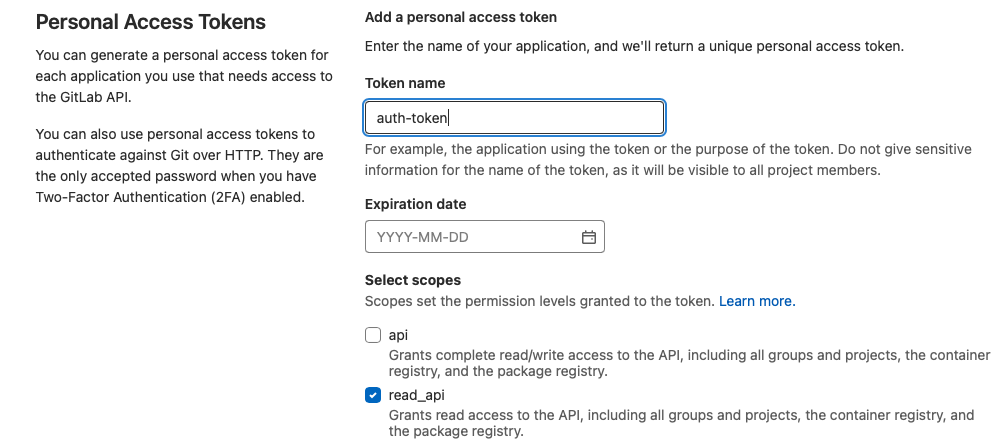
-
Click "Create personal access token" and copy the token.
