Troubleshooting / FAQ
Source System: Microsoft SharePoint Online
Locked Site Collections
In Microsoft SharePoint Online, site collections can be locked.
Sites locked with NoAccess will be excluded from any traversal.
Content Traversal
Content Type Hierarchy
The Microsoft SharePoint Online connector iterates over the following hierarchy for every discovered site collection:
-
Site Collection
-
Root Site
-
Lists
-
Items & Folders
-
Attachments
-
-
-
Document Libraries
-
Files & Folders
-
-
Sub Sites
-
…
-
-
-
Each content traversal considers some advanced source system settings implicitly.
Traversal Flags
If set, the following flags result in the exclusion of documents:
| Flag | Context | Description |
|---|---|---|
|
Sites & Lists |
The advanced site and list settings provide an option to prevent content from being indexed into search. |
|
Lists |
Microsoft SharePoint Online lists can be configured as hidden. |
|
Lists |
Microsoft SharePoint Online lists can be configured as private. |
|
Lists |
Internal lists which are used for the content management are marked as catalogs. |
List Advanced Settings
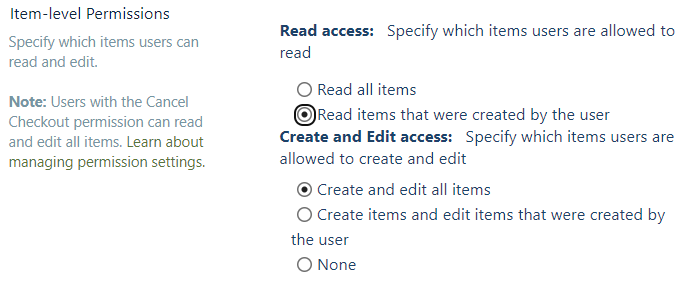
Setting: Item-level Permissions
In order to restrict the access to list items Item-level Permissions can be
defined. If the property Read items that were created by the user is checked,
the traversed list documents can only be read by the author and the site
collection admins. Cancel Checkout permissions are not supported by the
connector.
Principal Traversal
The ACL for documents extracted from Microsoft SharePoint Online contain the following types of principals:
| Type | Example | Description |
|---|---|---|
Site collection group |
Connector defined reference to a SharePoint Online site collection specific group. |
|
Entra ID group |
1b6943f1-5983-45a5-a259-3a553de4c79f |
The object ID of an Entra ID group. |
Entra ID user |
The user principal name of an Entra ID user. |
|
Everyone, except external |
spo-grid-all-users |
Microsoft SharePoint Online specific role, which includes all active and
|
Everyone |
all |
Role which includes all Entra ID users. |
The principal synchronization performs following tasks:
-
Resolution: Site collection groups (memberships)
-
Resolution: Entra ID groups (member- & ownerships)
-
Resolution: Roles (memberships)
-
Streamlining: Adds additional principals, so the Entra ID synchronization can be shared between connectors of different source systems.
Optimization: Principal Traversal
In case multiple Entra ID based connectors should be run in parallel, the Entra ID synchronization tasks would be run multiple times. This can be prevented by setting up one connector to perform the complete Entra ID synchronization and all other connectors to focus only on the source system specific principals.
If the Microsoft SharePoint Online connector should perform the full Entra ID
synchronization, the principal synchronization algorithm
Full SharePoint Online and all Azure AD groups and users can be configured.
Otherwise, only Microsoft SharePoint Online specific principals can be resolved via
the algorithm Only SharePoint Online groups.
Target System: Apache Solr
Schema Handling
Before each content traversal the Apache Solr connector will fetch the schema for the collection to index documents into. Only metadata defined in the schema, will be indexed for each document. The connector considers explicit and dynamic schema fields.
The following field type classes will result in a special preprocessing:
| Class | Preprocessing |
|---|---|
|
Metadata field values which match a schema field of this type are formatted to ISO-8601 standard with second precision. |
| Schemaless mode is not supported! |
|
In case all extracted metadata should be indexed, the following dynamic field definition can be added to the schema: This way all not explicitly defined fields will be interpreted as text fields. |
Special Metadata
Between connectors a defined set of metadata is streamlined. These standard metadata will take precedence before metadata extracted from the source system. In case a field name extracted from the source system clashes with the name of a standard metadata field, only the standard metadata field is indexed.
| Standard Metadata Field | Description |
|---|---|
title |
The (interpreted) title of the document. |
sourceName |
The name of the source system. |
sourceUrl |
The URL pointing to the source system. |
sourceType |
The source system type. |
itemType |
The type of the item / document. |
clickUrl |
The clickable URL referencing the document. |
lastModifiedDate |
The last modification date. |
createdDate |
The creation date. |
previewUrl |
A URL which points to a preview of the document. |
mimeType |
The mime type of the document. |
authorId |
The ID of the author. |
authorName |
The display name of the author. |
fileExtension |
The file extension. |
fileType |
The pretty name of the file type. |
contributorIds |
A list of contributor IDs. |
contributorNames |
A list of contributor names. |
breadcrumbNames |
A list of names referencing items in the hierarchy above the current document. |
breadcrumbUrls |
A list of URLs referencing items in the hierarchy above the current document. |
languages |
A list of languages. |
keywords |
A list of keywords. |
content |
The document’s content as part of the metadata. |
docAllowAcl |
The allow document ACL. |
docDenyAcl |
The deny document ACL. |
Scheduling Commits
Commits to the index will not be triggered by the connector. In order to make data searchable, either commit manually or schedule automatic commits. For further information see the Official Apache Solr Documentation.